
20 Nov, 2026Mahesh Kale
Monk CI Docker Cache: Cold vs Warm Builds
Learn how to compare cold and warm Docker builds on Monk CI, check cache invalidation, and measure build time without misleading speed claims.
A build gets faster on its second run. Was that Docker cache, a warm base image, or a quieter machine?
Before comparing Monk CI Docker cache runs, separate those conditions. This article gives a repeatable test method; it does not present a measured speedup.
Give each run a clear job
Monk CI retains Docker build state across runs. To see what that changes, test four cases with the same Dockerfile, runner size and build settings :
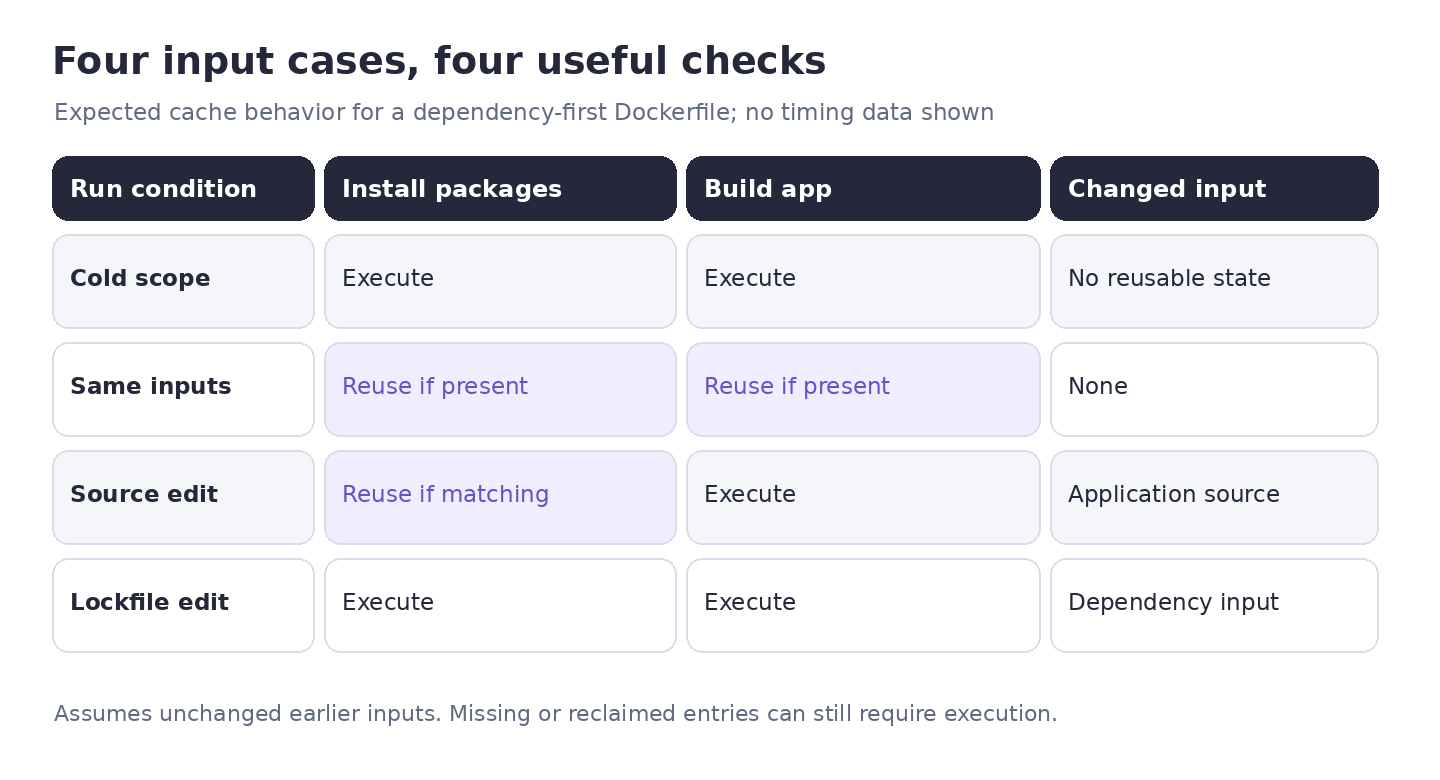
Expected behavior, not timing results. Reuse still depends on matching inputs and available cache.
The cold run establishes your starting point. An unchanged rebuild checks reuse. A source-only edit checks whether package installation stays cached. A lockfile change checks whether the right work runs again.
Keep the base image digest, tool versions, build arguments and output settings fixed. Otherwise, you may compare different jobs without realizing it.
Use the same clock
The current Monk CI build action exposes build-duration. In the v1 definition checked for this article, it measures the docker buildx build command in whole seconds. It excludes earlier runner startup and builder setup; enabled image-output work happens inside that command.
After checkout, inside a job running on Monk CI, capture the relevant outputs:
- uses: MonkCi-Inc/setup-docker-builder@v1
  id: builder
  with:
    nofallback: true

- uses: MonkCi-Inc/build-push-action@v1
  id: image
  with:
    context: .
    push: false

- name: Record the build
  env:
    CACHE_FOUND: ${{ steps.builder.outputs.cache-hit }}
    CACHE_ROLE: ${{ steps.builder.outputs.cache-role }}
    BUILD_SECONDS: ${{ steps.image.outputs.build-duration }}
  run: |
    printf 'cache_found=%s role=%s build_seconds=%s\n' \
      "$CACHE_FOUND" "$CACHE_ROLE" "$BUILD_SECONDS"
For this dedicated test, nofallback: true prevents a local fallback from silently changing what you measure. It does not force a warm cache.
Record the full job time separately. The developer waits for the job, not just the build command.
Cold needs a definition
A fresh runner is not proof of an empty retained cache. Agree on a clean, isolated test scope before calling a run cold.
Likewise, no-cache: true forces build-step execution, but does not prove that base-image storage and other caches are empty. Label it as a cache-bypass run unless you have controlled those other conditions.
Avoid deleting a shared production cache just to get a clean test.
A miss can be correct
Consider a single-package Node app that copies package.json and package-lock.json, runs npm ci, then copies source files.
A source edit can leave the install step reusable. A lockfile edit should cause the install to run again. The useful check is whether changed inputs trigger the right work, not whether every line says CACHED.
A setup-level cache-hit also does not prove that every Dockerfile step reused a result. Read the step logs.
Report results someone else can inspect
Repeat each case several times. Keep raw logs, commit IDs, action revisions, runner specs, failures and the exact cold-cache definition with the results.
Report the median and spread, rather than the fastest run. Compare elapsed time and billed cost separately. If comparing providers, disclose hardware and cache-state differences.
Keep output handling identical, too. A build that pushes an image includes registry work that a build without a push may avoid. If one run retries a download or fails halfway through, retain that record rather than quietly dropping it from the comparison. Context makes the result more useful.
Takeaway: change one input at a time, check which steps ran, and measure the full wait. That gives you a useful explanation for the number.